joe E-Commerce
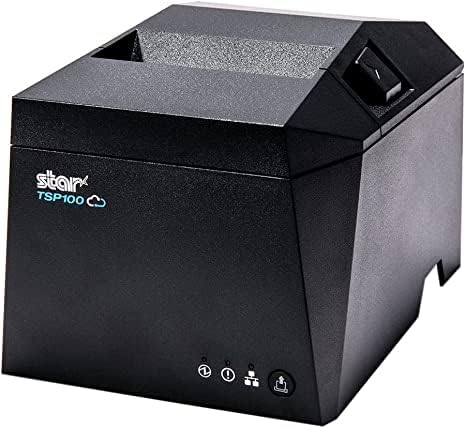
Star Micronics TSP143 Printer Thermal or Sticky
Star Micronics TSP143 Printer Thermal or Sticky
Couldn't load pickup availability
Compatible with Joe POS and the Joe OS App
All TSP143 models listed here are tested and supported with the Joe OS App. Whether you are connecting over Ethernet at a fixed counter or via Bluetooth from a tablet, the printer works with Joe POS without additional configuration.
- Plug-and-play setup through the Joe OS App printer settings
- Ethernet and Wi-Fi models connect over your local network — no USB required at the terminal
- Bluetooth pairs directly to the Joe OS tablet
- USB connects directly to the Joe OS terminal via USB-C
- All models support receipt printing, auto-cut, and logo printing through Joe POS
- CloudPRNT-capable models can receive print jobs from the cloud for online order workflows
USB — Direct Wired Connection
The simplest and most direct option. Plug the printer into the Joe OS terminal and it is ready to print. No network setup, no IP address, no router dependency. TSP143IV models use USB-C, which also supports Android Open Accessory (AOA) for direct communication with Android-based Joe POS hardware.
- Zero network dependency — works regardless of network status
- Plug-and-play with Windows, macOS, and Android via AOA
- USB-C compatible with Joe OS Android terminals
- Straightforward setup for a single dedicated terminal
- USB cable included
Note: USB connects one printer to one device. If multiple stations need to print to the same printer, choose Ethernet or Wi-Fi.
Models: TSP143IIIU | TSP143IVU
Ethernet — Wired Network Connection
The most reliable option for a fixed counter setup. The printer connects to your router or network switch over a standard LAN cable and gets its own IP address, allowing multiple Joe POS terminals to send print jobs to the same printer.
- Stable wired connection — not affected by Wi-Fi interference or signal drops
- Shared by multiple terminals over the same network
- Supports CloudPRNT for cloud-based and online order printing
- Recommended for high-volume locations or anywhere multiple registers share one printer
- Works with your existing router or managed network switch
Note: Best for fixed counter installs, multi-register locations, and anywhere you already have Ethernet at the POS.
Models: TSP143IIILAN | TSP143IVUE (USB-C + Ethernet)
Bluetooth — Direct Wireless Pairing
Pairs directly with a Joe OS tablet or terminal without needing a network connection. Once paired, the device connects automatically on startup. No router, no IP address, no network configuration required.
- Direct pairing with iOS, Android, and Windows devices
- No network infrastructure required — works even if Wi-Fi is down
- Pairs once, reconnects automatically on startup
- Ideal for tablet-based Joe POS setups, mobile carts, or pop-up service points
- No Ethernet cable run needed at the printer
Note: Bluetooth connects to one device at a time. If multiple terminals need to share a printer, use Ethernet or Wi-Fi instead.
Models: TSP143IIIBi2 | TSP143IVUEWB X4
Wi-Fi — Wireless Network Connection
Connects to your store's existing Wi-Fi network and receives its own IP address, just like an Ethernet model — shareable by multiple Joe POS devices without running a cable to the counter.
- Dual-band WLAN — supports both 2.4 GHz and 5 GHz networks
- Connects to your existing store Wi-Fi — no extra hardware needed
- Shareable across multiple Joe POS terminals over the network
- Supports CloudPRNT for remote and cloud-based print jobs
- Useful for locations where running an Ethernet cable is not practical
Note: Wi-Fi performance depends on signal quality at the printer location. For high-volume printing, a wired Ethernet connection is more consistent.
Models: TSP143IVUEWB X4
TSP143IV SK — Sticky Label and Receipt Printer
The TSP143IV SK is a thermal printer that does double duty — it prints both standard receipt paper and repositionable linerless sticky labels. You do not need a separate label printer. Load linerless label rolls for order labeling and bag tags, or swap to regular receipt paper when you need customer receipts. Same printer, both jobs.
Compatible with Joe POS and the Joe OS App.
What makes the SK different from the standard TSP143IV:
- Prints both linerless sticky labels and standard thermal receipt paper
- Labels stick to bags, boxes, cups, or any surface and peel off without leaving residue
- No silicone liner on label rolls — more labels per roll, less waste
- Adjustable print widths to fit different label and paper sizes
- Guillotine auto-cutter with drop-in paper loading
- Prints at up to 180mm per second
- Built-in power supply — no external brick
- EnergyStar certified
- Smallest 3-inch desktop sticky label printer on the market
Connectivity options on the SK:
- USB-C and Ethernet on the standard SK model
- USB-C, Ethernet, Wi-Fi, and Bluetooth on the SK X4 model
- Android Open Accessory (AOA) support on both
- CloudPRNT Next for cloud-based label and receipt printing
- Compatible with iOS, Android, and Windows
Label media:
- Star Blue Eco linerless labels — Prop 65 compliant and phenol-free
- 80mm width label rolls
- Also accepts standard 80mm and 58mm thermal receipt paper rolls
Good for:
- Locations that need both receipts and order labels from one device
- Order labeling for pickup, takeout, and delivery
- Drink and food item labeling at the counter
- Bag labels for online orders
Models: TSP143IVUE SK (USB + Ethernet) | TSP143IVUEWB SK X4 (USB + Ethernet + Wi-Fi + Bluetooth)
Share